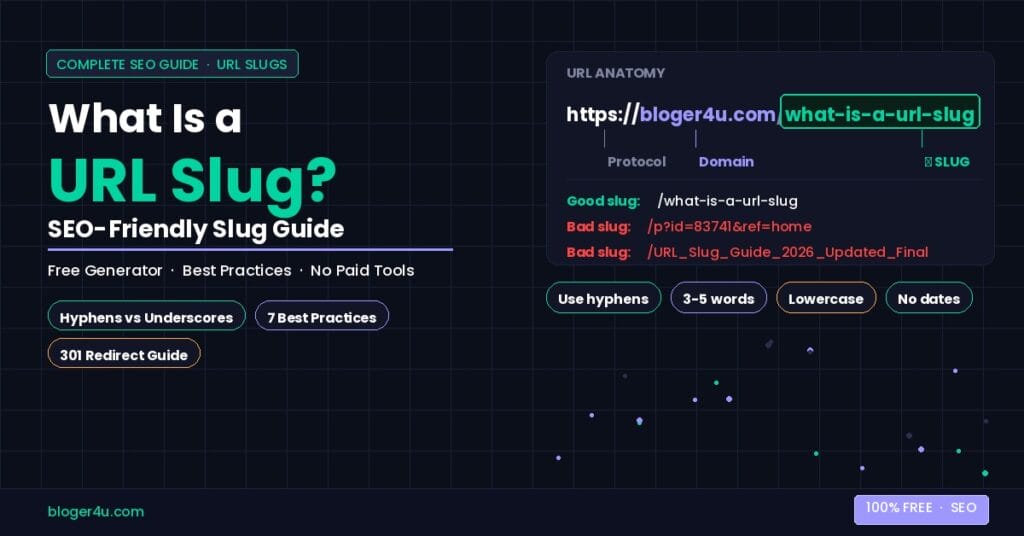
Your URL has three parts. The domain, the path, and the slug. Most people know the domain. Almost nobody thinks about the slug, which is exactly why it’s worth spending ten minutes on.
A bad slug costs you clicks. A good slug earns them. The difference takes about thirty seconds to fix before you publish.
What Is a URL Slug?
The slug is the last section of a URL that identifies a specific page. In the URL, bloger4u.com/what-is-a-url-slug the slug is /what-is-a-url-slug. That’s it. No mystery.
WordPress calls it a permalink. Shopify calls it a URL handle. Developers sometimes just call it a path. They all mean the same thing — the readable, human-facing part of your web address that describes what the page is about.
Does a URL Slug Actually Affect SEO?
Barely — and that’s straight from Google. John Mueller said the words in a URL are “a very, very lightweight factor” and that once Google crawls and indexes the content, it has far more useful information than the URL anyway.
So no, a good slug won’t rescue a weak page. But a bad slug can quietly cost you. Two things actually matter:
Click-through rate. People read URLs before they click. A slug-like /p?id=83741 tells a searcher nothing. A slug like /best-running-shoes-flat-feet tells them exactly what they’re about to get. Google displays roughly 50 to 60 characters of a URL in search results, so a readable slug uses that space productively.
Keyword placement. Google’s own documentation confirms it reads words in URLs. The keyword appears in one more place on the page — the address bar, the search snippet, and anchor text when someone links to you. That’s three low-cost signals for essentially zero extra work.
Hyphens vs Underscores — Google’s Actual Answer
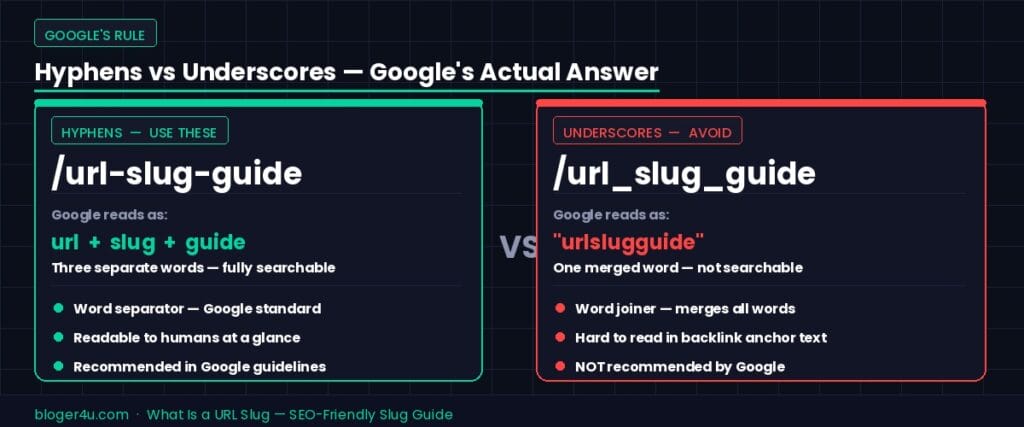
Use hyphens. Always. This one is not a matter of preference.
Google treats hyphens as word separators. A URL like /keyword-clustering-guide reads as three separate words: keyword, clustering, guide. Google treats underscores as word joiners. A URL like /keyword_clustering_guide this reads as one word: keyword clustering guide. That’s not a searchable phrase.
Google’s own documentation explicitly recommends hyphens over underscores in URLs. If your current URLs use underscores, changing them to use dashes is worth a 301 redirect — more on that below.
How Long Should a URL Slug Be?
Three to five words cover most cases. The slug /seo-friendly-url-slug is four words and easy to read. The slug /how-to-create-an-seo-friendly-url-slug-for-your-wordpress-website-in-2026 is exhausting and gets cut off in search results anyway.
A useful test: can someone read your slug out loud and immediately understand what the page covers? If yes, it’s probably the right length. If they have to think about it, cut words.
Google also clips long URLs in search snippets after roughly 60 characters. Everything after that becomes an ellipsis. Users see /what-is-a-url-slug-and-how-to-create... Instead of the full address, which is fine as long as the useful part shows up first.
Should You Remove Stop Words From URL Slugs?
Stop words are filler words — “a,” “the,” “and,” “for,” “in,” “of.” Most slug generators remove them automatically. The guidance on this has shifted over the years.
The short answer: remove them from most slugs, but keep them when removing them would change the meaning or make the slug read oddly.
/what-is-a-url-slug reads better with the “a” than without it. /how-to-create-seo-friendly-slugs reads fine without “an.” Use your judgment.
What you should always remove: numbers that date the content (unless the date is the point), special characters, capital letters, and spaces.
7 URL Slug Best Practices
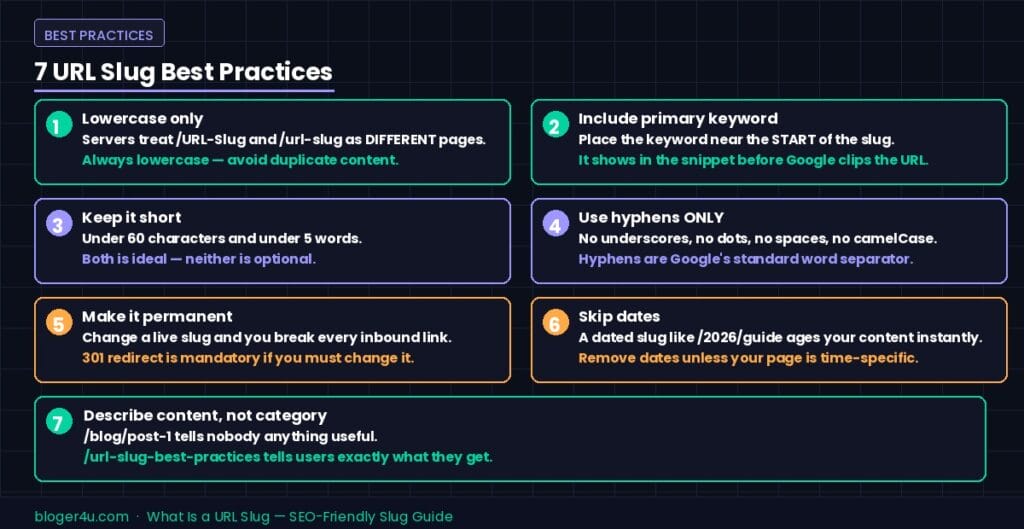
1. Use lowercase only. Servers treat /URL-Slug and /url-slug as different pages. That’s a duplicate content problem waiting to happen.
2. Include your primary keyword. Not because Google weighs it heavily, but because users read it. Put the keyword near the front of the slug where it shows before any clipping.
3. Keep it short. Under 60 characters. Under five words. Both if possible.
4. Use hyphens to separate words. No underscores, no dots, no spaces, no camelCase.
5. Make it permanent. Change a slug after a page has traffic, and you break every link pointing to it. If you must change it, use a 301 redirect immediately.
6. Skip dates unless you need them. A slug like /2026/url-slug-guide dates your content before anyone reads it. Unless you publish news or dated reports, keep dates out.
7. Describe the content, not the category. /blog/post-1 tells nobody anything. /url-slug-best-practices tells everyone exactly what they’ll find.
5 URL Slug Mistakes That Kill Rankings
- Keyword stuffing in the slug.
/url-slug-url-slug-best-seo-urlIt is not more optimized. It looks spammy and makes users distrust the link before they click. - Auto-generated slugs from titles. WordPress generates slugs from your post title by default. If your title is “What Is a URL Slug? A Complete Guide to SEO-Friendly URLs in 2026 (Updated),” the auto-generated slug is a mess. Always edit it manually before publishing.
- Changing slugs without 301 redirects. Every external link, bookmark, and indexed URL pointing to the old address becomes a dead end. Google sees the 301 redirect and transfers ranking signals to the new URL. Skip the redirect, and you start from zero.
- Duplicate slugs across similar content. Two pages with slugs
/seo-slug-guideand/url-slug-guide-seotargeting identical intent creates the same problem as keyword cannibalization. One page, one slug, one intent. - Including session IDs or parameters. URLs like
/page?session=abc123&ref=emailthese expose server architecture, change for every visitor, and create thousands of near-duplicate URLs in Google’s index. Use canonical tags or block them in robots.txt.
How to Change a URL Slug Without Losing SEO
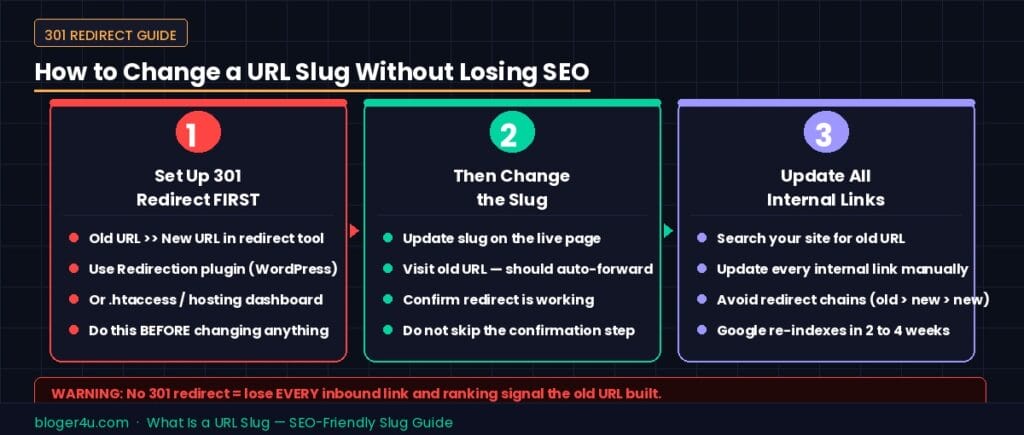
The three-step process:
Step 1: Set up the 301 redirect first. Before you change anything on the live page, create the redirect from the old URL to the new URL. In WordPress, the Redirection plugin handles this cleanly. In most other platforms, the .htaccess file or hosting dashboard settings do it.
Step 2: Update the slug. Change the slug to the new version. Confirm the redirect is working by visiting the old URL — it should automatically forward to the new one.
Step 3: Update internal links. Search your own site for any page linking to the old URL and update those links manually. Internal links that still point to the old slug create an unnecessary redirect chain.
Expect Google to take two to four weeks to fully index the new URL and reassign the ranking signals. Traffic may dip briefly during that window, then recover.
Free URL Slug Generator
Writing slugs manually for every post works fine for low-volume sites. Once you’re publishing consistently, a tool saves time and catches formatting errors you’d otherwise miss.
The free URL slug generator on bloger4u.com takes your title or phrase, strips stop words, replaces spaces with hyphens, converts everything to lowercase, and removes special characters in one step. Paste your title, copy the slug, and publish. No signup, no limit.
Frequently Asked Questions
Do URL slugs affect Google rankings?
Only very slightly. John Mueller confirmed that the words in a URL carry minimal weight compared to page content. But a clear, keyword-containing slug helps click-through rates, which does affect rankings over time.
How long should a URL slug be?
Three to five words, under 60 characters. Google clips longer URLs in search snippets, so keep the keyword near the front.
Can I change a URL slug after publishing?
Yes, but always set up a 301 redirect from the old URL to the new one first. Without it, you lose every inbound link and ranking signal the old URL had built.
Does a URL slug need to match the page title exactly?
No. The slug should be a condensed, clean version of the title — shorter, with no stop words or special characters. The title can be longer and more descriptive.
Will changing my URL slug hurt my SEO rankings?
Yes, changing a URL slug can hurt your rankings if it isn’t done correctly. When you change a URL, Google treats the new link as a brand-new page with zero ranking history. To protect your SEO, you must immediately implement a 301 redirect from the old URL to the new one. This tells search engines the page has permanently moved and passes nearly all of your existing ranking power and authority to the new link.
Final Thoughts
URL slugs are a small detail with an outsized effect on usability. Google barely weighs them in ranking. Users weigh them constantly — in the search snippet, in the address bar, in copy-pasted links. A clean slug that describes the content takes thirty seconds to write and pays off for the life of the page.
Get it right before you publish. Changing it after costs more effort than getting it right the first time ever would have.