Type three words into Google and watch what happens. The search bar finishes your sentence before you do. That’s not magic — it’s Google Autocomplete reading millions of real searches and handing you free keyword ideas on a silver platter.
Most guides to long-tail keyword research stop at “use a keyword tool” and call it a day. This one doesn’t. Below are five real, free ways to find long-tail keywords, plus the exact process for turning one seed keyword into a usable keyword list for your SEO strategy.
What Counts as a Long-Tail Keyword?
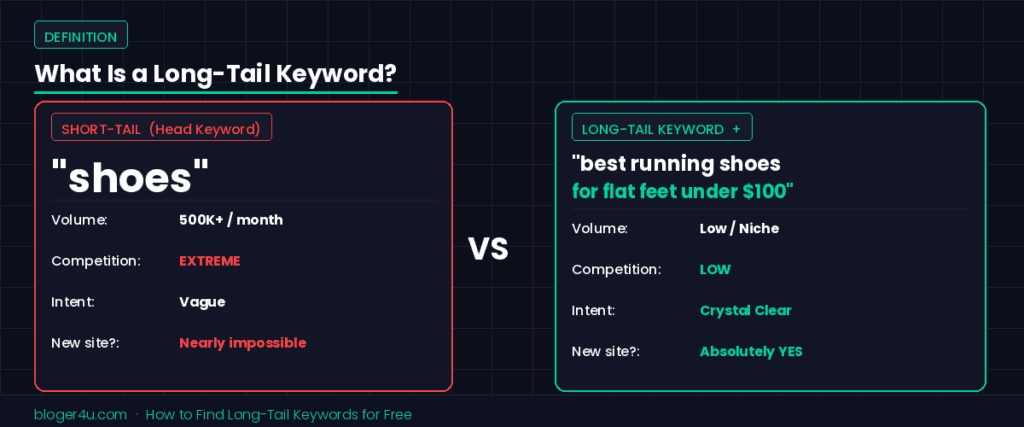
A long-tail keyword is a specific, lower-volume search query — usually three words or more — that targets a narrow slice of intent instead of a broad topic. “Running shoes” is a head keyword. “Best running shoes for flat feet on a budget” is long-tail.
Word count is a rough guide, though, not a rule. Ahrefs analyzed its own keyword database and found that keywords pulling fewer than 10 monthly searches make up roughly 93% of the unique keywords it tracks in the US. That’s the real definition: a long-tail keyword sits in the low-volume “tail” of the search demand curve, not the high-volume “head.”
Funnily enough, the word “tail” didn’t start in SEO at all. Chris Anderson popularized the term in a 2004 Wired article about retail, describing how niche products with small individual sales could collectively outsell blockbuster hits. SEO borrowed the metaphor a few years later, and it stuck.
Why Bother With Long-Tail Keywords at All?
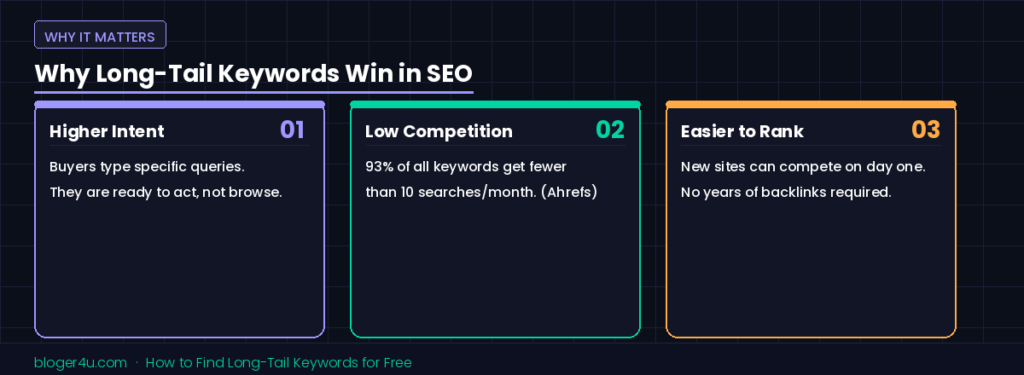
Short, broad keywords carry high search volume but vague intent. Long-tail keywords win on intent instead. Someone searching “shoes” could be browsing, researching, or just bored at work. Someone searching “best waterproof hiking boots for wide feet under $100” is one click away from buying.
This matters for a free keyword research strategy because every competitor with a marketing budget piles onto the same broad keywords fast. Long-tail keywords face less competition, so a newer site has a genuine shot at ranking without years of backlinks behind it. Stack a few hundred relevant long-tail keywords together, and the combined search volume usually beats chasing one impossible head term anyway. Finding good keywords for SEO has never really been about hunting one perfect seo keyword; it’s about owning a whole neighborhood of smaller ones.
Method 1: Google Autocomplete
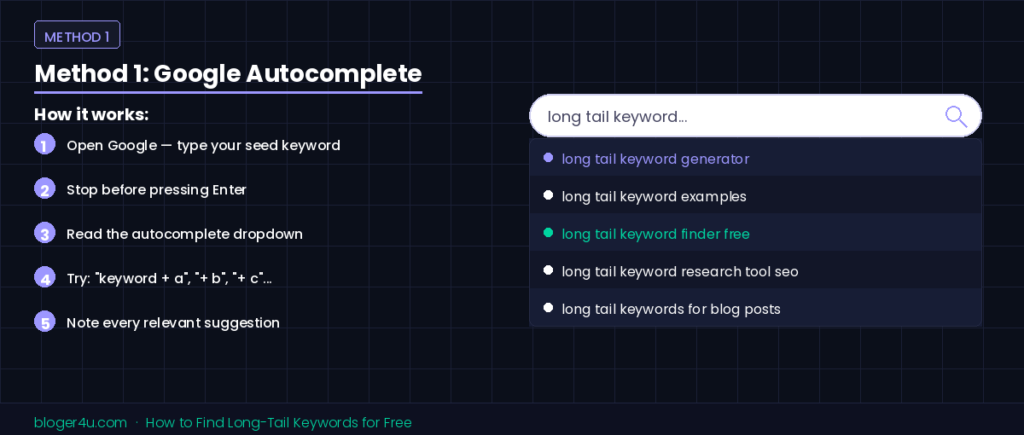
Open Google, type your seed keyword, and stop. Don’t hit enter. The dropdown that appears is Google Autocomplete — Google built it from real queries other people have typed. It’s essentially a free long-tail keyword generator that Google built for itself, and it happens to work for you too.
Add a letter after your seed keyword (“long tail keyword a,” “long tail keyword b,” and so on) to pull a fresh batch of suggestions for each letter of the alphabet. It’s a little tedious. It’s also a completely free tool, and the suggestions come straight from Google instead of a third party’s guess — call it a keyword finder hack, or just call it Autocomplete.
Method 2: People Also Ask and Related Searches
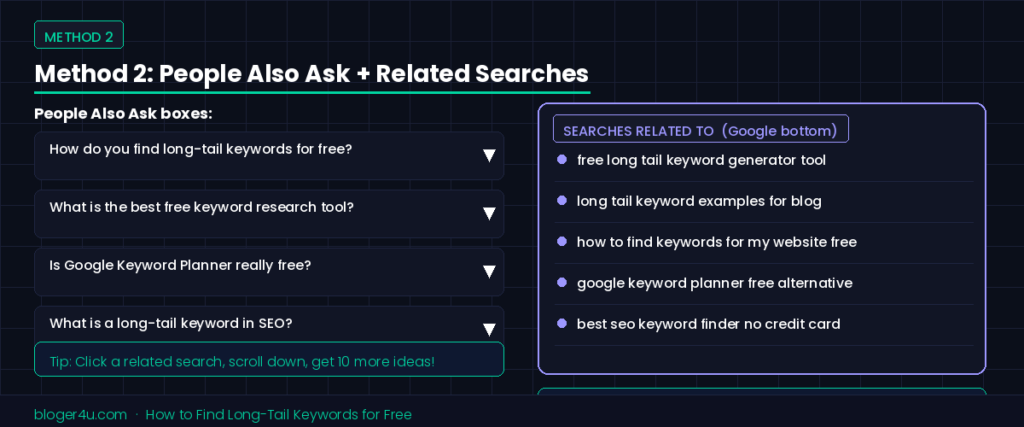
Search engines already do some of the keyword research for you. Scroll past the first few results on Google, and you’ll usually spot a “People also ask” box, plus a “Searches related to” section near the bottom. Both are full of long-tail keywords that real searchers actually wanted to know.
Click one of the related searches, scroll to the bottom of those search results, and you’ll get another fresh batch. Repeat the loop a few times, and you’ll build a solid list of keywords without opening a single paid tool.
Method 3: Your Own Google Search Console Data
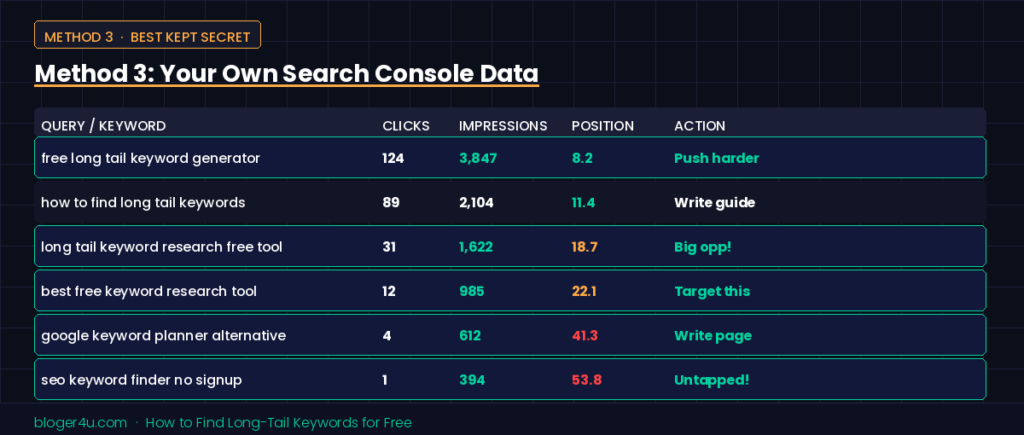
This one almost nobody mentions, and it’s probably the best free keyword research tool you already own. If your site has even a few months of history, Search Console’s Performance report shows the exact queries people typed before your page appeared in results, including impressions for terms you never deliberately targeted.
Google’s own Search Console documentation confirms the report breaks down clicks, impressions, and average position by query, and that the Queries tab shows exact, non-case-sensitive matches. Google also anonymizes very rare or sensitive search terms instead of displaying them, so if a row in your export reads something like “keyword4521” rather than real words, that’s privacy filtering doing its job, not a glitch in your spreadsheet.
Sort that report by impressions with low or zero clicks, and you’ve found a list of long-tail keywords people are already searching for — keywords your site is already eligible to rank for, just not ranking well yet. That’s the cheapest content research you’ll ever run.
Method 4: Google Keyword Planner

Google Keyword Planner lives inside Google Ads and gets an unfair reputation for needing a credit card. That part’s true: Google’s own Keyword Planner help page confirms you need to complete Google Ads account setup, including billing details, before the tool unlocks. The good news is you don’t have to spend a cent or run a live ad. Create a campaign, pause it immediately, and Keyword Planner stays free indefinitely.
Once you’re in, click “Discover new keywords,” enter a seed keyword or a competitor’s URL, and Google Keyword Planner returns a batch of related keywords straight from Google’s own search data. Without active ad spend, search volume shows up as a broad range instead of an exact number, which is mildly annoying but still useful for spotting keyword opportunities your other tools might have missed. Keyword Planner won’t score keyword difficulty the way paid tools do, but its Competition column (low, medium, high) works as a rough free stand-in.
Method 5: Forums, Reviews, and Real Customer Language
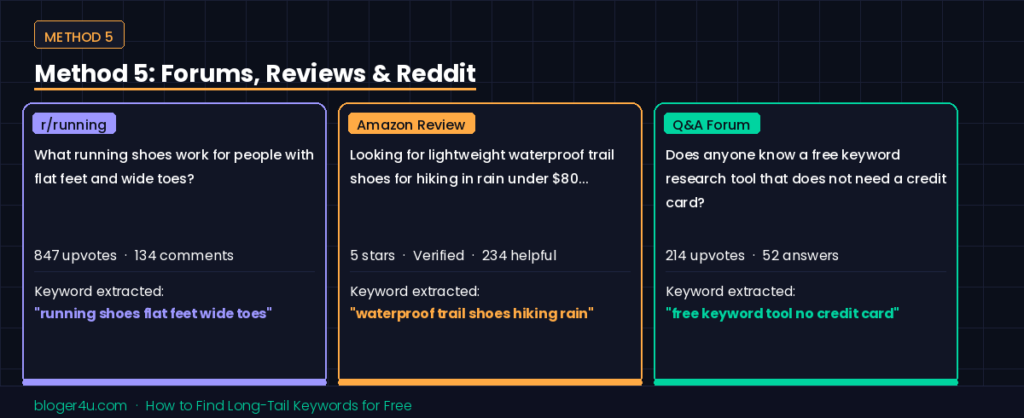
Keyword tools run on search data. Forums run on real human sentences. Reddit threads, niche forums, and product reviews are full of the exact phrasing your future customers use, often messier and more specific than anything a typical SEO keyword tool would suggest.
Search “site:reddit.com [your topic]” on Google, or browse a relevant subreddit, and pay attention to how people actually describe their problems. Those phrases make excellent long-tail keywords precisely because almost nobody else is targeting them yet.
Turning One Seed Keyword Into a Full Keyword List
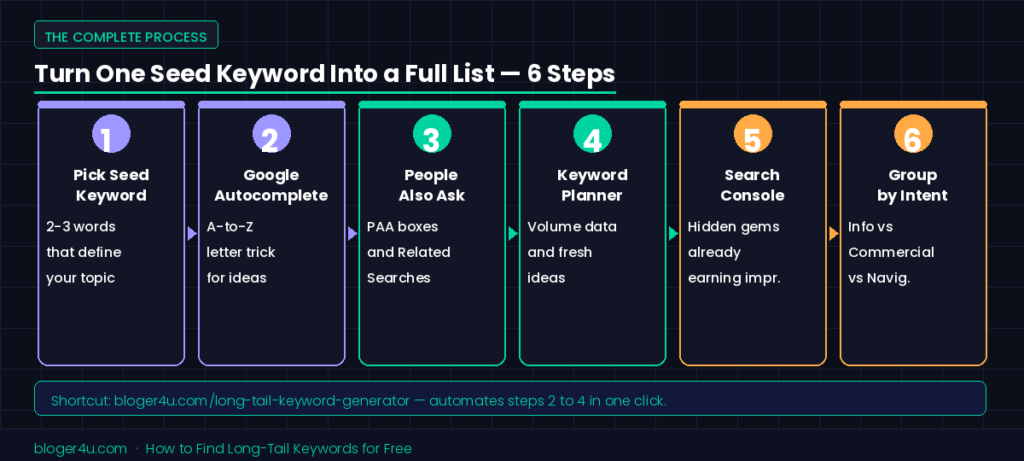
Here’s the process, start to finish:
- Pick one seed keyword that describes your topic in two or three words.
- Run it through Google Autocomplete and note every suggestion.
- Pull the “People also ask” and “related searches” results for that same term.
- Check Google Keyword Planner for additional related keywords and a rough search volume range.
- Cross-reference everything against your Search Console data to see which terms are already earning impressions.
- Group the results by intent (informational, commercial, navigational) instead of treating every keyword the same.
Picture starting with the seed keyword “meal prep.” Autocomplete might suggest “meal prep containers” and “meal prep for weight loss.” People also ask could add “is meal prepping cheaper than buying groceries.” Search Console might quietly reveal that your site is already getting impressions for “meal prep ideas for beginners,” a phrase you never deliberately wrote about. None of it costs anything but time, and within twenty minutes you’ll likely have more long-tail keyword ideas than a paid tool’s free trial gives you.
Six steps, zero budget, and a keyword list you built from actual search behavior instead of guesswork. If you’d rather skip the manual cross-referencing, a free long-tail keyword generator tool — like the one on our own site — automates steps two through four for you.
Where to Actually Use These Keywords
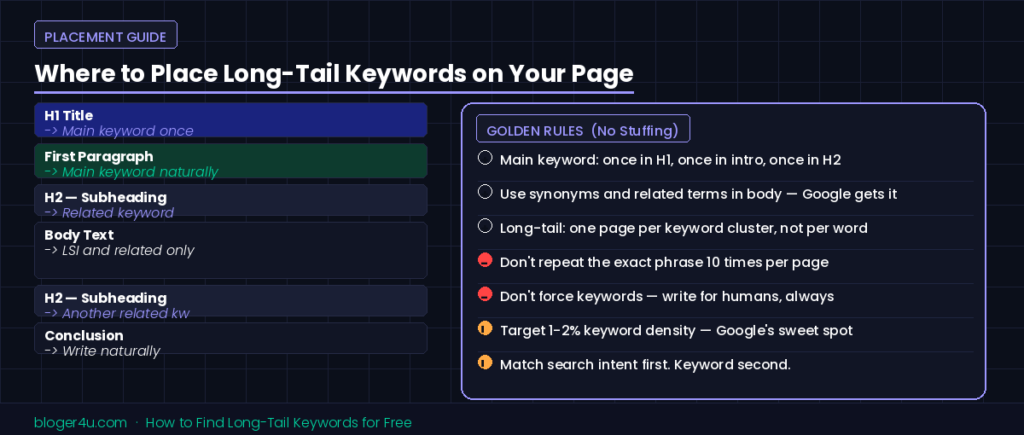
Finding long-tail keywords is half the job. Placing them naturally is the other half, and this is where many articles overcorrect by straight-up keyword stuffing.
Use your main keyword once in the title, once in the opening paragraph, and once in a subheading. After that, let related keywords and natural phrasing carry the rest of the page. Google’s ranking systems understand topics and synonyms now, not just exact-match strings, so writing for a human reader and writing for a search engine are basically the same job today.
Frequently Asked Questions
How many words make a keyword “long-tail”?
There’s no fixed number. Three or more words is a common rule of thumb, but search volume and specificity matter more than the word count itself.
Can I find long-tail keywords without any tool at all?
Yes. Google Autocomplete, “People also ask,” and your own Search Console data cost nothing and need no sign-up beyond a free Google account.
Do long-tail keywords still matter with AI search and AI Overviews around?
If anything, more than before. AI search tools tend to break a short question into several narrower sub-questions behind the scenes, and specific, well-answered long-tail content is exactly what those tools pull into their answers.
How do I use Google Autocomplete to find long-tail keywords?
Start by typing your main keyword into Google and review the suggested searches. Add extra words like “for,” “best,” “near,” or “how to” to uncover more specific long-tail keyword ideas based on real user searches.
What’s the easiest way to find long-tail keywords without paid tools?
The easiest way is to use free sources like Google Autocomplete, “People Also Ask,” Reddit, and YouTube search suggestions. These platforms help you discover real search queries, user questions, and low-competition long-tail keyword ideas without needing paid SEO tools.
Final Thoughts
Long-tail keywords won’t deliver an overnight traffic spike. What they deliver is a steady trickle of visitors who already know what they want, plus a real shot at ranking while your site is still young and a little broke. Pick one seed keyword, run it through the five free methods above, and build your first real list of keywords to target this afternoon. Want a head start instead of doing it by hand? Drop your seed keyword into our free long-tail keyword generator and skip straight to the list. Most seo professionals would agree either way: save the paid seo tools for later, once you’ve proven the idea works for free.